


Swifty USB Switch Interface
Swifty USB Switch Interface
SKU: Code: ORHM-0362-S
Low stock
Couldn't load pickup availability


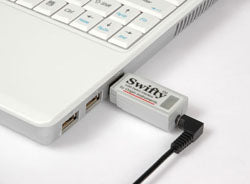
Tiny size. Huge possibilities
Swifty is a speedy USB switch interface in an extremely compact design. Swifty's universal ability to work with practically any host computer, tablet, smartphone or Speech Generating Device (SGD) means you only need one switch interface for practically all your switch scanning requirements. Working with up to two wired switches, or three wirelessly with Beam, this compact powerhouse can output mouse clicks, joystick buttons or keyboard characters.
Features and Benefits
- Lightning fast with extremely low latency
- Extremely low power
- 3.5-mm (1/8-inch) stereo jack
- Automatically detects stereo and mono plugs
- Up to 3-switch inputs with Beam Wireless Transmitter
- Wireless input with Beam
- Mouse button, joystick button and keyboard emulation modes
- Full speed USB device
- Supports USB Remote Wakeup
- Weighs 14-grams; dimension: 51 × 20 x 13 mm
- Origin Instruments Quality, Reliability and Support
Swifty accepts industry standard 3.5-mm, stereo or mono plugs for directly connecting up to two adaptive switches and Swifty is powered from the USB host so no external power is required. Swifty can automatically detect a switch's 3.5-mm (1/8-inch) mono or stereo plug, no need to configure for a single or dual switch. For connecting two mono switches (such as Orby) use an optional male stereo to 2 female mono splitter/adapter. It has two mono jacks for the switches and one stereo plug for the Swifty.
Swifty utilises standard USB Human Interface Device (HID) drivers and works with Windows, Mac, Chromebooks, Android tablets and smartphones, and most AAC/Speech Generating Devices (SGD).
Wireless Receiver Built-in
Swifty includes an integrated wireless receiver for communicating with Beam. Users can connect their adaptive switches to Beam for wireless access to Swifty, so they don’t have to stay tethered to the computer. Beam also has an additional input for supporting up to three adaptive switches.
Modes of Operation
There is no special software to install for configuration, just select mouse buttons, joystick buttons or keyboard characters using one simple DIP switch on the back of Swifty.
| USB Device | Interface Action |
|---|---|
| Mouse | Left, Right, Middle* |
| Joystick | Btn1, Btn2, Btn3* |
| Keyboard | Enter, Space, Tab* |
| Keyboard | 1, 2, 3* |
*Up to two switches can be directly connected to Swifty and up to three switches can be wirelessly interfaced with the optional Beam transmitter.
///
With Tapio and an adaptive switch, a single switch user can have complete access to an iPad, an iPhone or an iPod touch, and even macOS computers using Apple's Switch Control. A single switch scanner really can move the highlight to an app on the home screen, launch it, and scan to controls within the app. All that’s left is to plug an appropriate adaptive switch into Tapio, and attach it to an iOS Device using the included Apple Lightning to USB adapter.
Features and Benefits
- Lightning Fast and Low latency
- Very Low Power
- Host powered – No Batteries to Charge or Replace
- Reliable Direct Connection – No Bluetooth Pairing Issues, Drop-outs, or Sluggish Connections
- Use optional re-charge Lightning adapter to charge iPad/iPhone while using Tapio
- Multi-Platform:
- Apple iPad, iPhone and iPod touch
- Android Tablets and Smartphones
- Chromebooks
- macOS, Windows and Linux computers
- Accepts a Single Switch Directly
- Accepts Two Single Switches (3.5mm) with Stereo-to-Mono Adapter (optional)
- Accepts Dual Switches Directly with a stereo plug
- Supports Apple Switch Control Events (iOS7 and newer)
- Supports Switch Access for Android events (Android 5.0 and newer)
- Supports RJ Cooper Switch events
- High Performance Scan Modes
- Weighs 14-grams; dimension: 51 × 20 x 13 mm
- 1-year limited warranty
- Origin Instruments Quality, Reliability and Support
Direct Connect Switch Control provides access to Apple’s iOS touch interface
The beauty of a robust direct connection is there are no wireless worries with Bluetooth pairing, drop-outs, and sluggish connections. Forget about charging batteries too, Tapio doesn't have any – it sips power directly from the iPad.
Complete Switch Interface Solution
Tapio is a native USB switch interface that can be connected to an Apple iOS Device using an Apple USB adapter. It accepts industry standard 3.5 mm stereo or mono plugs, and directly interfaces up to two adaptive switches to an Apple iOS Device or computer. In addition to Apple iOS Devices, Tapio is a perfect interface for Windows, Android, Mac and Linux computers, and many Alternative and Augmentative Communication (AAC) devices.
A Note About Compatibility:
Apple iOS Devices have worked with direct connect USB keyboards since the early days of iPhone. However, Apple only officially supports Bluetooth keyboards. For this reason whenever you plug a USB keyboard into an iOS Device, or turn on an iOS Device with USB keyboard connected you will receive a notification or message telling you that it is not supported.
Since Tapio presents itself as a USB keyboard, you will see this message. Simply tap OK directly or scan to and “tap” OK to dismiss the dialog box.
Tapio’s integrated DIP Switch can be customised to select iOS Device specific modes, and mouse, joystick, or keyboard functions. How to set these modes with DIP switches.