


Point-It! Joystick
Point-It! Joystick
SKU: Code: UP-PJ-B-BT
Available on Back Order
Couldn't load pickup availability

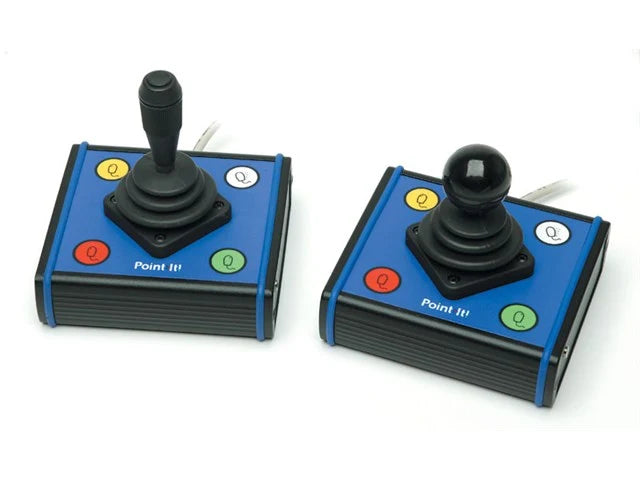
A mouse-alternative joystick with the same "feel" as a wheelchair joystick
Access your PC, Apple Mac, Android or iPad with a Point-It! joystick.
Point-It! Joysticks are an access solution for people who find it difficult to use standard computer mice. You can use them to move the pointer around the screen, make left and right clicks and control applications. Use a Point-It! to surf the web, catch up on emails, play games, watch YouTube and much more.
This small unobtrusive unit can be located close to a user or operated on a desktop. In addition it has fixings in its base so that it can be attached to a Universal Switch Mounting System and positioned effectively for chin control.
Four switches are used to operate mouse button functions left click, double click, right click and mouse speed. A fifth switch located in the top of the standard knob also operates the left button. 3.5mm jack sockets allow connection of standard switches for those who find it difficult to operate the switches on the unit itself. DragLock feature allows a user to drag without having to keep the left button pressed.
The switch buttons have an activation force of less than 150 grams. They are water resistant and provide a large target area with colourful symbols, a domed surface and a tactile feel.
Features
- Compact joystick which gives accurate proportional control of the mouse pointer
- Supports standard mouse button functions plus DoubleClick, DragLock and MouseSpeed
- Bluetooth version can be configured as either a mouse or keyboard and has a long life rechargeable battery
- 3.5mm jack sockets for connection of external switches for left/right button control
- Can be located close to a user or fitted to standard mounting systems
- Onscreen keyboard software with word prediction is included free of charge
- Several different knobs are available.
Note: if you wish to change the knob, you need to order the Ball Knob version and the alternate knob(s) which you require. The Ball Knob can be then removed and the replacement knob can be fitted.