


HeadMouse Nano
HeadMouse Nano
SKU: Code: ORHM-0220
Available on Back Order
Couldn't load pickup availability


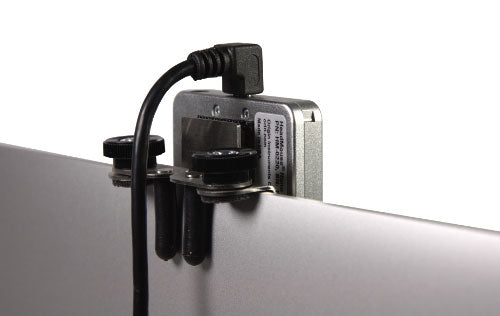
Wireless head controlled mouse
HeadMouse® Nano replaces the standard computer mouse for people who cannot use or have limited use of their hands when controlling a computer or alternative and augmentative communication (AAC) device. The HeadMouse translates natural movements of a user’s head into directly proportional movements of the computer mouse pointer, so as the user moves their head the mouse pointer on the screen also moves. The HeadMouse has a wireless optical sensor which tracks a tiny disposable target that is worn by the user on their forehead, glasses, hat, etc. It works just like a computer mouse, with the mouse pointer being controlled by head movement.
HeadMouse Nano provides hands-free access to a computer, tablet or Speech Generating/AAC Device (SGD).
Key Features
- Works on Windows, Mac, Android, Chrome, Linux – if it works with a USB mouse it works with HeadMouse
- Smooth and pixel precise control of the mouse pointer
- Works in any lighting environment – from complete darkness to full sun
- Works on virtually every platform – computers, tablets and AAC speech generating devices
- No power adapter – HeadMouse receives power through the USB connection
- Simple and hassle-free installation consists of plugging HeadMouse into a USB port
- Built-in switch input jack (3.5mm stereo) that accepts a dual switch (or two standard switches via a dual-mono-to-stereo adapter)
Benefits
Comfortable for the user
The HeadMouse will track the user’s head movement with the user located in any comfortable viewing position relative to the computer display.
Precision for all applications
With HeadMouse Nano's high tracking resolution, pixel precise control is available to everyone. This precision allows a user to perform such tasks as drawing, photo editing, graphic illustration, and Computer Aided Design (CAD).
Easy plug-and-play and USB compatible
HeadMouse Nano connects to the computer, tablet or AAC device through a USB port and operates using standard mouse drivers. No special software is required. The HeadMouse is powered by the host device, over the USB connection. The integrated electronic tilt sensor automatically adapts to any mounting orientation.
Comprehensive mouse click solutions
Mouse button click operations can be performed via an adaptive switch connected directly to the HeadMouse Nano via 3.5mm plug connector; or by mouse dwell click software that performs the click operation when the user “dwells” on a specific screen location. A dual-mono-to-stereo adapter is required to connect two mono switches directly to the HeadMouse Nano.
Compatible adaptive switches include Origin Instruments Sip/Puff Switch and Orby Switch, and dwell-to-click software, such as Dragger. HeadMouse Nano also comes with a built-in infrared receiver that provides optional wireless connection for adaptive switches using the Beam Wireless Switch Transmitter. The Beam Wireless Switch Transmitter lets users – for example, from a wheelchair – connect adaptive switches wirelessly to the HeadMouse Nano.
Onscreen keyboard options
When used with an on-screen keyboard such as SofType or KeyStrokes, HeadMouse provides access to the full range of keyboard and mouse functions.
Access for Alternative and Augmentative Communication Devices or SGDs
HeadMouse Nano provides reliable head-controlled access to augmentative communication devices that provide speech and environmental control. HeadMouse Nano integrates conveniently with systems from a variety of suppliers, Tobii DynaVox, Jabbla, Prentke Romich, and others.
If an augmentative communication device can be accessed with a standard USB mouse then it should be accessible with a HeadMouse.
Mounting Options
A variety of optional HeadMouse Nano mounts are available for notebook computers, flat panel displays and Alternative and Augmentative Communication (AAC) devices. If a mount for your needs is not currently shown, please inform us of your requirements.
Tip: Remember, HeadMouse Nano is so small the best mounting option may be attaching it to the front bezel, using the included Dual Lock kit. Just be sure not to cover one of the device's webcam, audio mikes, sensors, or infrared emitters. You can rotate and mount HeadMouse at any orientation, it will automatically align to your device display.
HeadMouse Nano Package includes:
- HeadMouse Nano and User Manual
- Back Mount Bracket (traditional style)
- Front Mount Bracket
- Extra Dual-lock
- Right-angle 2 metres (6.5 foot) and straight 60cm (2-foot) USB cables (USB 2.0 Type A to Micro-B)
- 50 target dots
- 2-year limited warranty
The Mounting Bracket for Notebook Computers is designed to attach the HeadMouse Nano securely to notebook-style computer displays. It also works well for many augmentative communication devices and flat-panel computer displays. The bracket comes with two sets of adjustable wire clips to accommodate the various thicknesses of displays.