


Five Finger Typist 2.2
Five Finger Typist 2.2
SKU: Code: SDFFT2
Quantity
Available on Back Order
Regular price
$135.00
Regular price
Sale price
$135.00
Taxes included.
Shipping calculated at checkout.
Couldn't load pickup availability


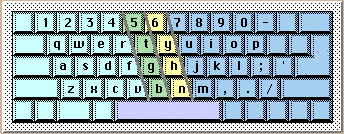
A one-handed typing tutor for Windows and Macintosh
Five Finger Typist is a typing tutor for people who want to learn one-handed touch typing, using either hand. It teaches the accepted keyboarding technique for single-handed touch typing on the standard (QWERTY) keyboard.
Five Finger Typist has a set of structured typing lessons which first teach the home position and then progressively introduce new keys and revise keys already learnt.
Extremely easy to use, even a novice can become a master typist.
Features and benefits
- Suitable for child or adult
- Opens up new communication skills – note taking, memos, letters, computer games and applications
- Learn a life-long skill not dependent on specialised keyboards and dedicated software which need to be taken with you
- Touch typing skills assist students in all levels of learning
- Touch typing skills assist adults in communication and employment
- An onscreen animated hand graphic shows the correct hand movement as keys are typed
- Either the right, or the left, hand can be chosen easily
- Lessons are graded, starting with simple exercises
- A self-paced typing program
New features in version 2
- New in version 2.2 Addition of a large font option for users with low vision. The very large font option offers a choice of an extra two screen font sizes of 36 and 48 point (font face: Arial bold). Improved exercises have also been added to a number of lessons.
- Auditory prompting of keys to practise during the typing exercises: a recorded voice will prompt you with the next 3, to 5, characters in the exercise line. When you have correctly typed these characters the voice will then speak the next 3, to 5, characters to type (and so on).
- A resizable main window, with the onscreen keyboard coloured in bands to show the keys typed with each finger
- A Customise option allows you to customise the program in ways to assist in the learning process:
- Over 3 screen font sizes – standard, medium or large, including 36 and 48 points
- typing sounds can be turned on – either the key typed is spoken, or a typewriter sound is made when you type
- a typing-error sound can be chosen
- Saving to a personalised progress file allows you to restart at the last lesson saved and with the same settings
Click on the next tab to see Five Finger Typist - How it works.